Most SEO platforms label their crawl reports as “audits,” and that single naming convention has created one of the most persistent misconceptions in search optimization. Understanding the difference between SEO audits and website crawls is not a matter of semantics. It directly determines whether you act on strategic insight or simply react to raw, uninterpreted data.
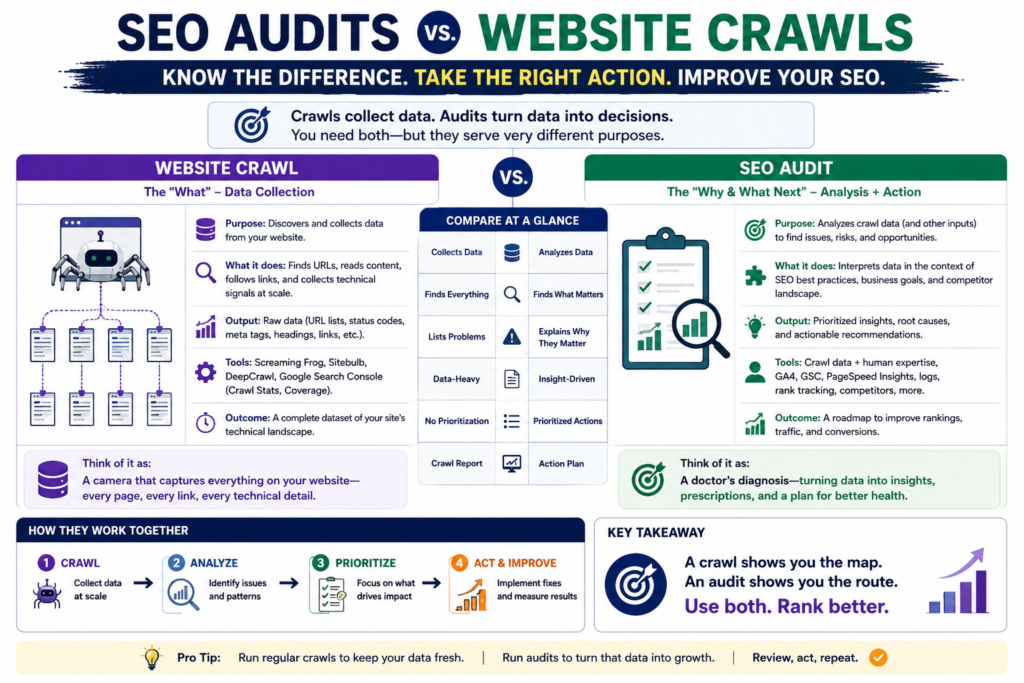
Table of Contents
- What Is the Difference Between an SEO Audit and a Website Crawl?
- How Does a Website Crawl Actually Work?
- What Data Does a Crawl Actually Collect?
- What Does a Real SEO Audit Cover (And What It Doesn’t)?
- Technical vs. On-Page vs. Content Audits: Which Do You Need?
- When Should You Run a Crawl vs. a Full SEO Audit?
- Why Most SEO Tools Blur the Line Between Crawls and Audits
- How to Turn Crawl Data Into an Actionable SEO Audit
- The Hidden Cost of Confusing Crawls With Audits in Real SEO Projects
- Frequently Asked Questions
- How often should you do an SEO audit?
- Is an SEO audit worth it?
- Which tool is best for a website SEO audit?
- Can ChatGPT do an SEO audit?
- What is the 80/20 rule of SEO?
- How many times should you audit your site for SEO?
- What is the real cost of skipping a proper SEO audit and relying only on crawls?
- Conclusion
A website crawl is a data collection process: automated bots systematically scan your site’s URLs, indexing technical signals like broken links, redirect chains, missing meta tags, and page speed issues. An SEO audit is the analytical layer built on top of that data, interpreting findings within the context of your business goals, competitive landscape, and search performance. Studies suggest that up to 60% of identified technical issues from crawls are low-priority or irrelevant without that interpretive context.
Both processes are necessary, but they serve fundamentally different roles in an SEO workflow. Treating a crawl report as a finished audit is like reading a lab test without consulting a doctor. You have numbers, but no diagnosis.
TL;DR: Understanding the difference between SEO audits and website crawls is essential for making smarter decisions with your SEO data. A website crawl is an automated data collection process that follows links and catalogs page-level signals, while an SEO audit is a strategic interpretation of that data combined with sources like Google Analytics and Search Console to diagnose real problems. Most popular tools like SEMrush, Ahrefs, and Screaming Frog blur this line by labeling crawl reports as “audits,” which leads teams to treat raw crawl output as a finished analysis. Confusing the two carries a real cost: incomplete prioritization, wasted resources, and missed revenue opportunities that only proper human judgment can prevent.
Key Takeaways
- A website crawl is purely a data-collection process that maps URLs and harvests technical signals, while an SEO audit interprets that data alongside Google Analytics, Search Console, backlink profiles, and competitor benchmarks to diagnose root causes and prioritize fixes.
- Running a full SEO audit when a quick crawl would suffice wastes hours of work, so match the tool to the situation: use crawls for routine monitoring and audits only when a traffic drop or major site change demands root-cause analysis.
- Popular tools like SEMrush, Ahrefs, and Screaming Frog label their products “audits” but are technically crawlers with scoring layers, meaning their flagged issues still require human interpretation before they become actionable recommendations.
- Converting crawl data into a real audit requires a structured workflow that draws a hard line between raw data collection and strategic interpretation, ensuring the output is a prioritized action plan rather than an unsorted list of URLs.
- Treating crawl output as a finished audit actively misdirects SEO investment, often for months before anyone identifies the error, making the cost of confusing the two far greater than just wasted time.
What Is the Difference Between an SEO Audit and a Website Crawl?
An SEO audit is a strategic evaluation that interprets data to diagnose problems and recommend prioritized fixes, while a website crawl is an automated data-collection process that maps a site’s URLs and harvests technical signals including status codes, meta tags, canonical tags, and internal links. A crawl produces raw data. An audit produces a diagnosis.
This distinction matters more than most SEO practitioners realize. According to Ahrefs’ 2024 SEO industry survey, over 60% of SEO professionals report receiving “audit reports” from clients that are, in reality, uninterpreted crawl exports. Raw crawl data without analytical interpretation is not an audit, regardless of what the software calls it.
| Dimension | Website Crawl | SEO Audit |
|---|---|---|
| Purpose | Collect technical data across all URLs | Diagnose problems and prioritize fixes |
| Output | Raw data: status codes, tags, links, redirects | Actionable recommendations with business context |
| Who performs it | Automated bots (Screaming Frog, SEMrush, GSC) | SEO strategist or analyst interpreting crawl data |
| Frequency | Weekly or continuous monitoring | Quarterly or at key project milestones |
| Tools involved | Screaming Frog, Sitebulb, Google Search Console | Crawl tools + analyst judgment + business context |
| Actionability | Low without interpretation | High, with prioritized next steps |
Google Search Console functions as a crawl-adjacent tool: it surfaces what Googlebot actually sees when it visits your site, including crawl errors and index coverage gaps. But GSC data still requires a human to determine which issues need immediate attention and which are cosmetic.
SEMrush is a prime example of a platform that blurs this line. Its “Site Audit” feature runs a full crawl and flags issues by severity, but the output is still a categorized crawl report. Turning it into a true audit requires an analyst to layer in keyword performance, competitive gaps, and business priorities.
Important: Never confuse a tool’s “audit score” with an actual SEO audit. A 94/100 health score tells you nothing about why your highest-value pages are losing rankings.
For a deeper look at the tools that power both processes, see this breakdown of technical SEO tools tested across real site crawls.
Key differentiator: A crawl tells you what exists on your site. An audit tells you what it means and what to do about it.
How Does a Website Crawl Actually Work?
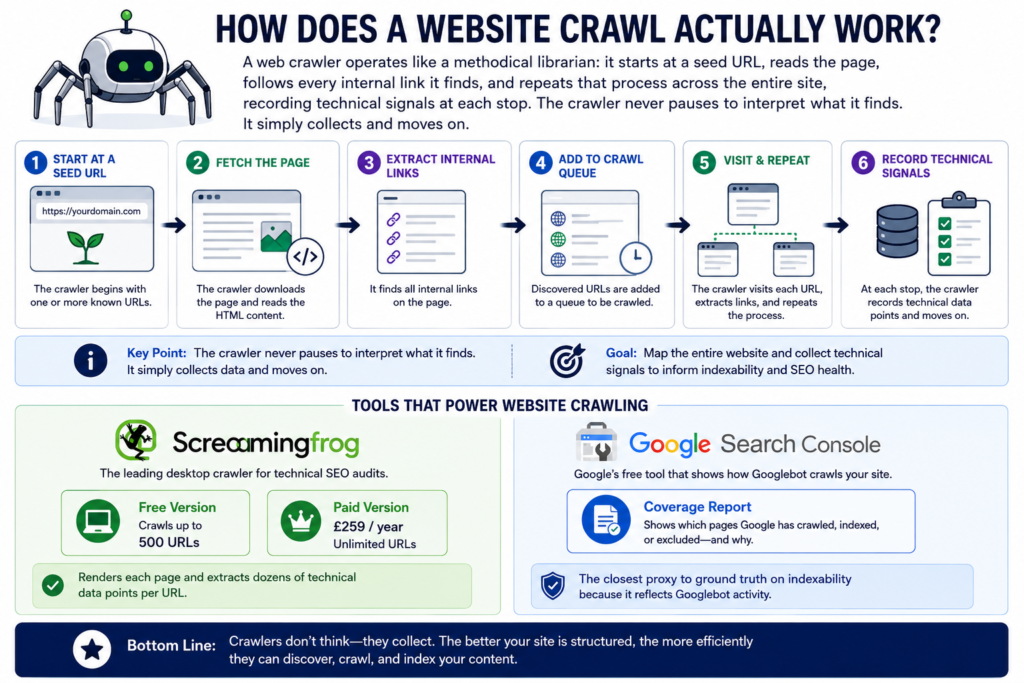
A web crawler operates like a methodical librarian: it starts at a seed URL, reads the page, follows every internal link it finds, and repeats that process across the entire site, recording technical signals at each stop. The crawler never pauses to interpret what it finds. It simply collects and moves on.
Tools like Screaming Frog and Google Search Console are the most widely used instruments for this process. Screaming Frog’s desktop crawler can process up to 500 URLs for free, and unlimited URLs on its £259/year paid tier, rendering each page and extracting dozens of technical data points per URL. Google Search Console’s Coverage report reflects how Googlebot itself has crawled your site, making it the closest proxy to ground truth on indexability.
What Data Does a Crawl Actually Collect?
A standard crawl captures the following signals from every page it visits:
- HTTP status codes (200 OK, 301 redirects, 404 not found, 5xx server errors)
- Redirect chains and redirect loops
- Meta titles and meta descriptions (present, missing, or duplicated)
- Canonical tags (self-referencing, cross-page, or conflicting)
- Hreflang attributes for multilingual sites
- Internal link relationships and link depth from the homepage
- Page depth (how many clicks from root to reach a URL)
- robots.txt directives blocking or allowing crawl access
- XML sitemap discrepancies (URLs in the sitemap not found on-site, or vice versa)
- Crawl errors including broken links and server timeouts
One concept every SEO practitioner needs to understand here is crawl budget: the number of pages Googlebot will crawl on a given domain within a set timeframe. According to Google’s own crawling documentation, crawl budget is primarily a concern for sites exceeding tens of thousands of URLs, where wasted crawl on low-value or duplicate pages can delay indexing of critical content.
That limitation is exactly where a crawl hits its ceiling. A crawl might surface 200 pages with missing meta descriptions. It cannot tell you that only 12 of those pages receive organic traffic, or that just 3 sit in a revenue-critical conversion funnel. That prioritization is the job of an audit, not a crawler.
Pro Tip: Before running a website speed audit or any deeper technical analysis, run a crawl first to establish a baseline of what pages actually exist and how they connect.
The crawl gives you the map. The audit tells you which roads are worth paving.
What Does a Real SEO Audit Cover (And What It Doesn’t)?
A real SEO audit is a structured diagnostic process that combines crawl data with external data sources, including Google Analytics, Google Search Console, backlink profiles, and competitor benchmarks, to identify the root causes of performance problems and generate a prioritized action plan. Where a crawl collects, an audit interprets. That distinction determines whether your team fixes the right problems first or burns weeks patching symptoms.
According to Ahrefs’ 2024 SEO research, 90.63% of pages get zero organic traffic from Google, and most of them have fixable issues that a raw crawl output would surface but never explain. An audit answers the “so what” question the crawl never does.
SEMrush and Ahrefs both extend beyond crawling into full audit workflows: SEMrush’s Site Audit module layers on keyword cannibalization detection and Core Web Vitals scoring, while Ahrefs pairs crawl data with its backlink index to flag link equity leaks, capabilities a standalone crawler simply cannot replicate.
Important: An SEO audit is not a one-time deliverable. Running one after a site migration, after a significant traffic drop, or when onboarding a new client captures problems that accumulate invisibly over time.
Technical vs. On-Page vs. Content Audits: Which Do You Need?
Most SEO problems trace back to one of three audit scopes. A full audit combines all three, but understanding each scope helps you match the diagnosis to the symptom.
| Audit Type | What It Examines | Key Signals |
|---|---|---|
| Technical SEO Audit | Infrastructure and crawlability | Crawl errors, indexing issues, Core Web Vitals, structured data, mobile-first indexing, SSL/HTTPS |
| On-Page SEO Audit | Individual page optimization | Keyword targeting, meta optimization, internal linking strategy, keyword cannibalization |
| Content Audit | Strategic content quality and gaps | Thin pages, topical gaps, information architecture, content decay |
If organic traffic has plateaued despite consistent publishing, a content audit typically reveals the culprit: thin pages diluting topical authority or keyword cannibalization eroding rankings across similar URLs. If the site recently migrated, a technical SEO audit takes priority to confirm redirects, canonical signals, and indexing are intact. On-page audits are most valuable when individual pages underperform despite strong backlink profiles, pointing to misaligned keyword targeting or weak meta signals.
For agencies managing multiple clients, pairing audit workflows with purpose-built white label SEO platforms can dramatically reduce the manual overhead of repeating this diagnostic process across accounts.
Pro Tip: Run all three audit types sequentially when onboarding a new client. Start technical, then on-page, then content. Fixing crawlability before content strategy prevents your recommendations from conflicting.
The audit is only as actionable as the data sources feeding it. Crawl data alone cannot tell you whether a page’s traffic decline is a technical failure, a content relevance problem, or an authority deficit. That answer requires synthesis across multiple data inputs, which is exactly what separates an audit from a crawl.
When Should You Run a Crawl vs. a Full SEO Audit?
Knowing which data sources to combine solves one problem. Knowing when to pull each one solves another. Running a full audit when a quick crawl would do wastes hours. Running only a crawl when a traffic collapse demands root-cause analysis wastes weeks on the wrong fixes.
The trigger event, not personal preference, should determine which process you run.
| Trigger Event | Run a Crawl | Run a Full SEO Audit |
|---|---|---|
| After a code push or site deploy | ✅ Regression check | ❌ Overkill |
| CMS or hosting migration | ✅ Verify redirect chains, status codes | ✅ Post-migration audit required |
| Sudden indexation drop | ✅ Identify crawl blocks immediately | ✅ Diagnose root cause across GSC + crawl data |
| Routine site monitoring | ✅ Weekly or monthly cadence | ❌ Too frequent to be useful |
| Onboarding a new client | ✅ As the first data-collection step | ✅ Full audit follows crawl |
| Google algorithm update caused traffic drop | ❌ Crawl won’t reveal content/authority issues | ✅ Multi-source diagnosis required |
| Organic traffic flat or declining 60+ days | ❌ Insufficient alone | ✅ Synthesis across Analytics, GSC, backlinks needed |
| Before a major redesign or content investment | ✅ Baseline snapshot | ✅ Audit defines what to preserve or fix first |
| Quarterly SEO health check | ✅ Feed fresh data into the process | ✅ Recommended for all active sites |
How often should you do an SEO audit? Most SEO professionals recommend quarterly audits for active sites, with technical crawls running continuously or triggering automatically after every significant site change. According to Semrush’s 2024 State of Content Marketing report, sites that conduct regular structured audits are significantly more likely to report strong organic results than those relying on ad-hoc reviews.
Pro Tip: Pair your SEO ranking reporting software with a scheduled crawl cadence so ranking shifts and technical regressions surface in the same workflow, not in separate siloed reports.
For post-migration scenarios specifically, run a crawl within 24 hours of go-live to catch broken redirects, then schedule the full post-migration audit at the 2-week mark, once Google has had time to re-crawl and register changes in Search Console.
Think of the crawl as the stethoscope and the audit as the full diagnostic workup. The stethoscope should be used continuously. The full workup runs on a schedule, or when symptoms escalate.
Why Most SEO Tools Blur the Line Between Crawls and Audits
The stethoscope analogy breaks down the moment you open SEMrush’s “Site Audit,” Ahrefs’ “Site Audit,” or Screaming Frog and see a score, a severity rating, and a list of flagged “issues.” Every one of those products is, at its core, running an automated crawl. The “audit” label is a marketing decision, not a methodological one.
This naming convention creates a costly illusion. A crawl tool can surface 500 flagged issues in minutes. A skilled SEO professional reviewing that same dataset will typically determine that only 10 to 20 require immediate action, with the remainder being low-priority, context-dependent, or simply irrelevant given the site’s business goals. The tool has no way to know that your 404 pages are intentional redirects-in-progress, that your thin content pages are placeholders for a product launch next month, or that your largest crawl budget drain is a staging subdomain that Google has already been asked to ignore.
According to Ahrefs’ own documentation, their Site Audit product checks for over 100 technical SEO issues automatically. That breadth is genuinely useful for data collection. But breadth without business context produces noise, not strategy.
The human judgment gap shows up in three specific ways that automated tools cannot bridge:
- Revenue prioritization: A tool flags duplicate title tags across 200 pages equally. A skilled SEO professional weights the fix by the revenue each page generates.
- Root-cause diagnosis: Tools identify symptoms. They cannot distinguish between a crawlability problem caused by JavaScript rendering versus one caused by misconfigured server directives.
- Strategic opportunity detection: Content gaps, competitor positioning shifts, and topical authority weaknesses are invisible to any crawler.
Google Search Console remains the most underused crawl-adjacent tool in this category: it’s free, Google-native, and reports actual Googlebot coverage data that third-party crawlers can only approximate.
Important: Teams that treat automated “site audit” reports as finished audits routinely spend sprint cycles fixing issues that move zero ranking needles. The output of any SEO audit tool is always the *starting point* of an audit, never its conclusion.
The crawl data is indispensable. The interpretation is irreplaceable, and no tool ships that second part by default.
How to Turn Crawl Data Into an Actionable SEO Audit
Interpretation is what converts a spreadsheet of URLs into a revenue-protecting action plan. The five-step workflow below makes that conversion explicit and draws a hard line between where the crawl ends and the audit begins.
Step 1: Run a full site crawl to collect baseline technical data.
Use Screaming Frog SEO Spider or Google Search Console’s Coverage report to harvest status codes, redirect chains, canonical tags, metadata, and internal link structure. Export everything. This is your raw dataset, nothing more.
Step 2: Layer in performance data from Google Search Console and Google Analytics.
Import organic impressions, clicks, and click-through rates at the URL level from Search Console. Append session volume, bounce rate, and conversion data from Google Analytics. Now each URL has both a technical fingerprint and a business value attached to it. This two-layer merge is what separates a crawl report from audit-ready data.
Pro Tip: Match crawl data to Search Console performance data using a VLOOKUP or a pivot table in Google Sheets. URLs with high impressions and crawl errors should immediately jump to the top of your priority list.
Step 3: Segment and prioritize issues by impact.
Separate findings into three tiers: critical blockers (crawl errors, canonicalization failures, Core Web Vitals failures on high-traffic pages), moderate issues (thin content, missing H1s, orphaned pages), and low-priority cosmetic fixes. According to Google’s own documentation, Core Web Vitals scores directly influence page experience signals used in ranking, making them a non-negotiable Tier 1 priority for any high-traffic URL.
Step 4: Conduct qualitative analysis on top landing pages.
Review your highest-traffic and highest-impression pages manually for on-page optimization, content relevance, and keyword alignment. No crawler reads intent. This step cannot be automated, and it is where most teams underinvest.
Step 5: Produce a prioritized recommendations document with effort/impact scoring.
Assign every finding an effort score (low, medium, high) and an impact score. Sequence fixes by highest impact at lowest effort first.
Note: Steps 1 and 2 are the crawl phase. Steps 3 through 5 are the audit phase. Conflating them is how teams end up fixing 301 redirects on pages that drive zero traffic.
Can ChatGPT do an SEO audit? AI tools, including those covered in our breakdown of AI vs. traditional SEO tools, can help interpret crawl exports and draft prioritized recommendations, but they require structured CSV or JSON inputs and human validation at every step. The output quality is only as good as the data you feed in.
The crawl phase takes hours. The audit phase takes judgment. Budget your time accordingly.
The Hidden Cost of Confusing Crawls With Audits in Real SEO Projects
Judgment is expensive when it’s absent. Treating crawl output as a finished audit doesn’t just produce incomplete analysis. It actively misdirects the people and hours your organization invests in SEO, often for months before anyone notices the damage.
Consider two scenarios that play out in real SEO projects with alarming frequency.
Scenario 1: A development team receives an automated “audit” report from Screaming Frog or SEMrush Site Audit and spends three weeks resolving every flagged error: duplicate title tags, missing H1s, redirect chains. The issues are real. The fixes are competent. Organic traffic continues to decline anyway. The actual cause is keyword cannibalization across twelve product pages competing for the same transactional query. That finding requires Search Console click data, ranking analysis, and strategic interpretation. No crawl surfaces it, because crawlers read HTML. They don’t read intent.
Scenario 2: An agency delivers a 50-page crawl export to a client and labels it an “SEO audit.” Without prioritization, the client’s marketing team spends six weeks correcting broken image alt text across a blog archive. Meanwhile, crawl budget waste on thousands of paginated URLs remains unaddressed, and Googlebot never reaches the site’s highest-converting product pages. According to Ahrefs’ analysis of 1 billion pages, 90.63% of pages get zero organic traffic. Misallocated effort is one of the most reliable ways to stay in that majority.
These aren’t edge cases. They are the predictable consequence of poor SEO resource allocation when crawls and audits are treated as the same deliverable.
Important: The 80/20 rule applies directly here. Roughly 20% of technical and on-page fixes drive 80% of measurable organic performance improvement. Only a structured audit, one that cross-references crawl data with analytics, Search Console, and competitive signals, can isolate that 20%. A crawl alone cannot prioritize; it can only enumerate.
The most effective SEO programs treat these as complementary layers, not interchangeable terms. Crawls run continuously as a monitoring instrument. Audits run quarterly, or when organic traffic decline demands a root-cause investigation. If your strategic SEO analysis process skips the interpretation layer, you’re not running an audit. You’re running a very expensive checklist.
The distinction is not academic. It determines whether your team fixes the right 20% or the noisiest 80%.
Last updated: 2026-05-07
Frequently Asked Questions
How often should you do an SEO audit?
Most websites benefit from a full SEO audit once or twice per year, with more frequent audits recommended after major site changes like redesigns, migrations, or significant content overhauls. If you are running website crawls monthly or quarterly, those can serve as checkpoints between full audits to catch technical regressions early.
Is an SEO audit worth it?
Yes, especially for websites that have been live for more than a year without a structured review. An audit surfaces issues that crawl data alone cannot catch, including content quality gaps, missed keyword opportunities, and backlink problems that directly affect rankings and organic traffic.
Which tool is best for a website SEO audit?
No single tool covers everything a true SEO audit requires. Screaming Frog and Sitebulb are strong for crawl-based technical data, while Ahrefs and Semrush add keyword and backlink layers. A complete audit typically combines data from multiple tools alongside manual analysis.
Can ChatGPT do an SEO audit?
ChatGPT can assist with parts of the audit process, such as analyzing content, identifying optimization opportunities in text, or summarizing crawl data you provide. It cannot crawl your site, pull live ranking data, or access your analytics, so it works best as a supporting tool rather than a standalone audit solution.
What is the 80/20 rule of SEO?
In SEO, the 80/20 principle suggests that roughly 20 percent of your optimization efforts, fixing critical technical issues, targeting the right keywords, and building authoritative links, will drive about 80 percent of your organic results. Knowing this helps you prioritize audit findings instead of treating every issue as equally urgent.
How many times should you audit your site for SEO?
A practical baseline is one thorough audit per year for stable sites and two per year for actively growing or frequently updated ones. Larger e-commerce or enterprise sites with thousands of pages often benefit from rolling audits that focus on specific sections or issue categories throughout the year.
What is the real cost of skipping a proper SEO audit and relying only on crawls?
Relying solely on crawl data means you are only seeing technical surface issues while missing content relevance problems, competitive gaps, and user experience factors that affect rankings. Over time, this creates a false sense of security where a site appears technically healthy but continues to underperform in search.
Conclusion
The smartest move you can make after reading this is to stop treating crawls and audits as interchangeable, because that single confusion is quietly derailing more SEO projects than most teams realize. Understanding the difference between SEO audits and website crawls means recognizing that crawl data is your raw signal, and a true audit is the strategic layer that tells you what those signals actually mean for your business goals.
Run crawls continuously, or at a minimum after every significant site change. Reserve full audits for quarterly reviews, new client onboarding, post-migration checks, and major algorithm updates. That cadence gives you both the speed of automated detection and the depth of genuine strategic analysis.
Here is your concrete next step for this week: open Google Search Console or Screaming Frog, run a crawl on your site, and then ask yourself one honest question: are the findings you are looking at raw data, or a prioritized action plan tied to business outcomes? If it is the former, you do not have an audit yet. You have a starting point.